

Membership and Unit Renewals
For Unit Leaders
All Membership Terms are now from the month of registration to 12 months later. Scouting America no longer uses a pro-rated membership year.
- All new youth and adult membership (or restarted after a lapse in membership) will start the month they register. For example, joining 8/3/2024 will mean your active membership year is 8/1/2024 to 7/31/2025. You will renew again on 7/31/2025.
- All members that renewed 12/31/2023 will have an annual 12/31 expiration date moving forward.
Individual Membership Renewals (youth and adults) and Unit Renewal will be completed through the individual (or parent's) My.Scouting.Org accounts.
- Memberships will be "eligible for renewal" 60 days prior to expiration date, and 60 days after expiration date. If after 60 days want to continue, reapply to a Unit using BeAScout.org and existing Scout ID to maintain your records.
- Forgot your My.Scouting.Org account information? Please use the Forgot Username / Forgot Password features at log-in.
ALL UNITS will renew on Calendar Year (expire annually December 31)
- Unit Renewal will be eligible to begin November 1 and are expected to be completed before 12/31.
- Completely separate from Unit Member renewal fees. Requires verifying Membership in unit and Unit Renewal Fee ($100).
If you have further questions, please contact Registrar@ggacbsa.org or your District Executive.
Current Membership Fees
Effective August 1, 2024, the Golden Gate Area Council youth and adult registration fees have been updated. The fee structure is:
- $155 for Cub Scouts, Scouts BSA, Venturing or Sea Scouts participants ($85 National Fee + $70 Local Council Fee)
- $110 for all Cub Scouts, Scouts BSA, Venturing or Sea Scouts, District or Council adult volunteers ($65 National Fee + $45 Local Council Fee)
- $50 for Exploring Post or Club participants and adult volunteers ($50 National Fee)
- $25 for Merit Badge Counselors ($25.00 National Fee + $0 Local Council Fee) (fee applies only for Merit Badge Counselors not already registered as leaders)
- $15 for Scout Life magazine subscription (Optional)
Meaning of "Auto-Renewal" and "Opt-Out" Options
"Automatic Renewal" and "Opt-Out"
Auto-Renewal does note mean it will auto renew your membership!
It means:
- Member intends to renew membership.
- Member and Unit will receive reminder emails when renewal is "Eligible to Renew".
- Will require the user "Start Renewal" manually through My.Scouting.Org.
- A member does NOT intend to continue with Scouting.
- Membership continues until existing expiration date.
- Stops email reminders to renew.
- Reversable until expiration date.
- After expiration use your existing Scout ID to re-active your membership via BeAScout.org
- Can be initiated or reversed by a Unit Leader.
Frequently Asked Questions
- What does “opt out” actually do?
“Opt out” should be used for people who are not renewing their membership in Scouting. It will stop the national automated renewal emails to the person. - If a unit opts for families to pay their own renewal fees, how do they select someone they don’t want renewed in their unit?
Contact the Registrar@ggacbsa.org. Unit cannot remove someone from their roster, unless person is transferring to another unit. - Does “opt out” immediately end someone’s membership?
No. The membership expiration date does not change. The person can continue full participation in the organization until this date. - Can we opt in someone who was previously opted out?
Yes. This will allow the member the option to "Start Renewal".
Unit Leader Role in Membership Renewals
Key Role in Membership Renewal:
1. Communication - You are key in checking in with families/volunteers that they need to renew memberships. Please review the resources below and help guide difficulties to your local District Executive and the Registrar@ggacbsa.org.
2. Adult Approval - Youth renewals will now be automatically approved in existing unit memberships. Adults will require the approval of the Charter Organization Representative (COR) or a COR Delegate when they renew their memberships. Please work with your Charter Org to see this process flows.
3. Youth Protection Training - Adult YPT must be current for the adult's full Membership Term. Do NOT approve an adult membership renewal to your unit if YPT does not cover the Membership Term. YPT expiration will be visible during Approval Process.
*For units that will pay directly for some/all memberships, close this view and go to the "Unit Paid Membership" section.
EMAILS
The Key 3 of each Unit will receive monthly emails listing those unit members Eligible to Renew (60 days prior to expiration date) and Expired (after expiration date). Expired will remain on your list until the grace period ends 30 days after the member's expiration date.
It is important to follow up with members listed in these emails. As this system is new some will ignore the email they received, miss it in spam, or have a wrong email listed.
ADDITIONAL WAYS TO SEE EXPIRING MEMBERS
1. MY.SCOUTING.ORG - ROSTER
Log into My.Scouting.Org. Select your unit and go to Roster. Each member's expiration date is listed on the right along with Renewal Status.
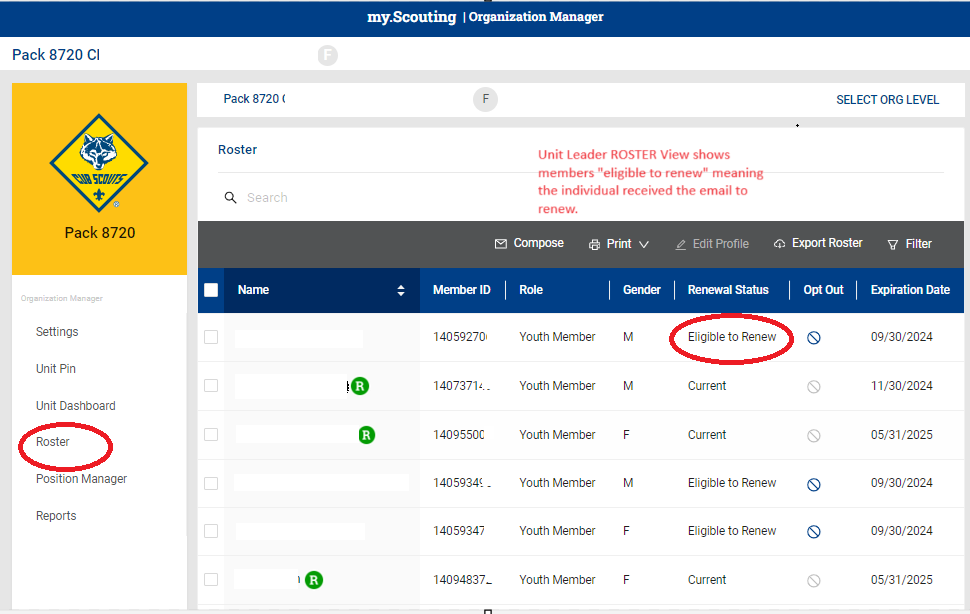
"Renewal Status" Definitions:
- Current – Membership is current. The renewal period for this person has not started.
- Eligible to Renew – TAKE ACTION Membership is current, but it is time to renew membership. Contact the member.
- Opted out – Member is leaving or has already left unit and membership is not being renewed
- Pending Approval – TAKE ACTION Renewal application and payment have been submitted, and the unit needs to approve the renewal to complete the process.
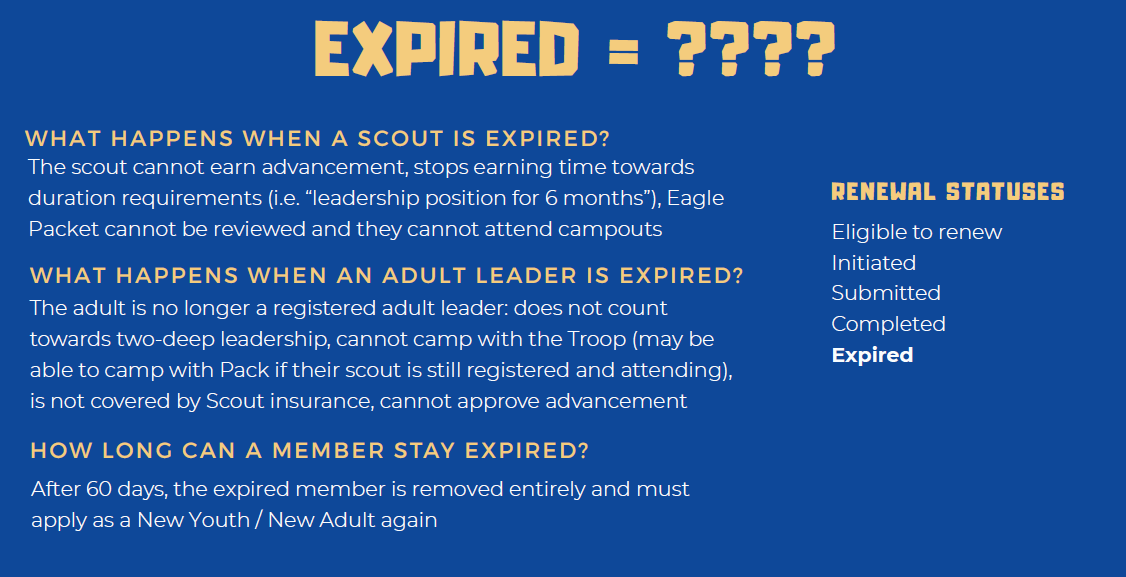
- Expired – Membership term has ended. Continued participation in the program requires re-registration through BeAScout.org.
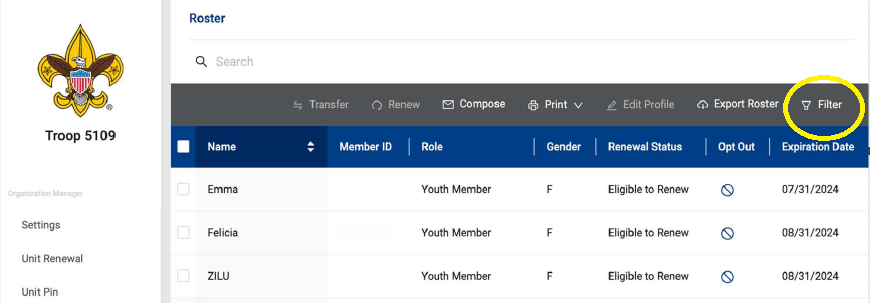
USING FILTER TO SEE RENEWAL STATUS GROUPS
In the Roster View, use the Filter option to see only Eligible for Renewal, Expired, or other Renewal Status phases as needed.
2. MY.SCOUTING.ORG - REPORTS
Use the Report feature found under Organization Manager for specific lists or member phases. Export to Excel as needed.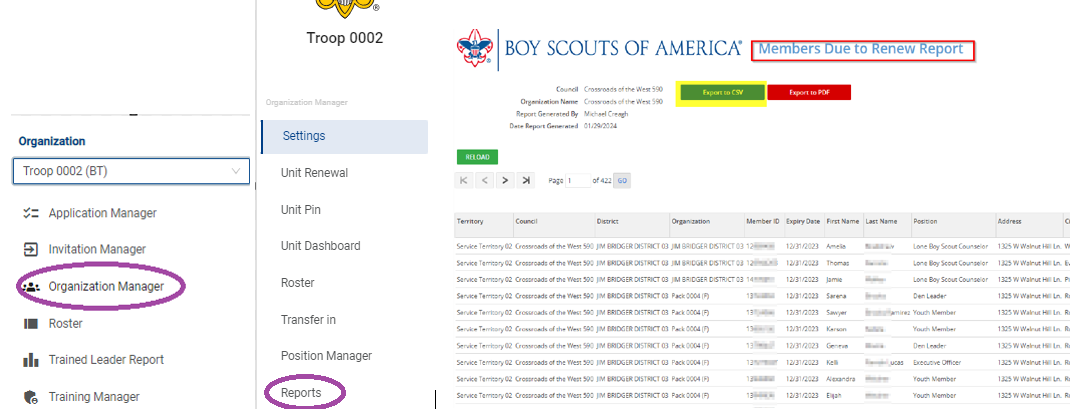
Report Options:
1. Member Opted-Out Report: Who has chosen not to renew.
2. Members Due to Renew: Who is due to renew is 2 months or lapsed.
2. Member Who Have Renewed: Who finished renewal.
4. Non Renewed Membership Report: List of dropped members.

Step #2 Scroll to the bottom of the screen, and click Membership Renewal Orders.

It will expand to show open "orders" that need to be approved. 
Step #3 - Check the YPT Expiration column and verify that it will expire beyond the Month shown in the Updated Date on the left. If not, stop and contact adult member to retake YPT.
Step #4 - (COR and COR DELEGATES ONLY) Click "APPROVE" on each member to complete their registrations.
If DO NOT ACCEPT is chosen:- Member's renewal process will be canceled.
- Fees paid will be automatically refunded.
- Registrar often needed to restart renewal process again.
Please familiarize yourself with the process by reviewing the Document included in the Parents Renewing for a Youth section above.
FREQUENTLY ASKED QUESTIONS
*How can my unit pay for member renewals?
See next section "Unit Paid Renewals". Units may select who to renew and can pay for membership renewals through the year.
*How long until Opt Out and Expired members fall off my roster?
Non-renewed memberships or Opt-Outs will drop off your roster 60 days after member expiration date.
*A Member is listed twice on my roster.
The Member has multiple Scout Accounts and paid twice. Contact Registrar@ggacbsa.org to resolve.
*Do I need to worry about checking Adult YPT for adult member renewals?
Yes. Do NOT Accept an adult without verifying they have current YPT and all other compliances (AB506). See Drop Box to check your adult compliances.
*Parent says they cannot find where to renew or cannot find their youth.
Please refer them to "Parents Renewing For a Youth" section above. If problem persists, please refer to your local District Executive or the Registrar@ggacbsa.org.
Who do I contact for help?
Please refer to your local District Executive or the Registrar@ggacbsa.org.
What about Unit Renewal?
See section on Unit Renewals below.
Unit Paid Membership Renewals
Units can pay to renew any or all of their members if they choose. The system allows you to select specific individuals who are "eligible to renew" and create a renewal batch. This can be done multiple times during the month.
Only Unit Key 3 can process renewals: Committee Chair, Charter Org Rep (COR), and Unit Leaders (Scoutmaster, Cubmaster, Skipper, Advisor).
Important Responsibility: Unit Leadership will need to review and complete this process regularly to avoid missing a membership renewal. Memberships will expire at different times of the year.Parents/Adults Members will still receive emails that their membership is expiring. Members still have the ability to pay for themselves, though once paid, the system will not allow for the same member to be paid twice.
UNIT PAID MEMBER RENEWAL TO COUNCIL OFFICE (Check/Cash)
1. Log into My.Scouting.Org - Organization Manager - Roster.
2. Select the Members you wish to renew.
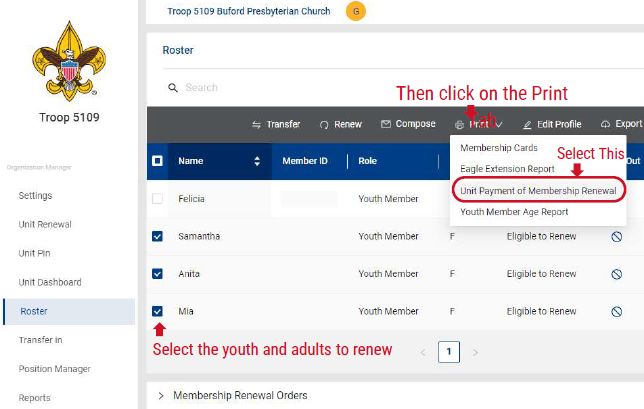
3. Go to Print - select "Unit Payment of Membership Renewal". A document will appear with the Members to be Renewed along with the fees due.
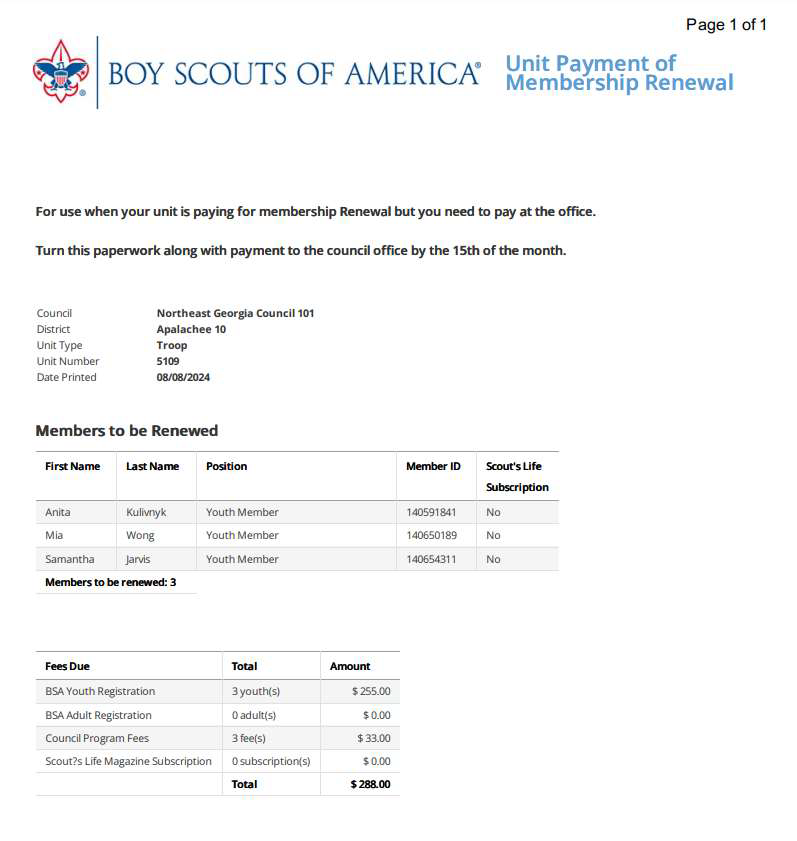
4. Mail this print out with payment to the Council Office: Attn: Registrar, Golden Gate Area Council, BSA, 6601 Owens Dr., Suite 100, Pleasanton, CA 94588.
5. Check your Roster to ensure processing completed.
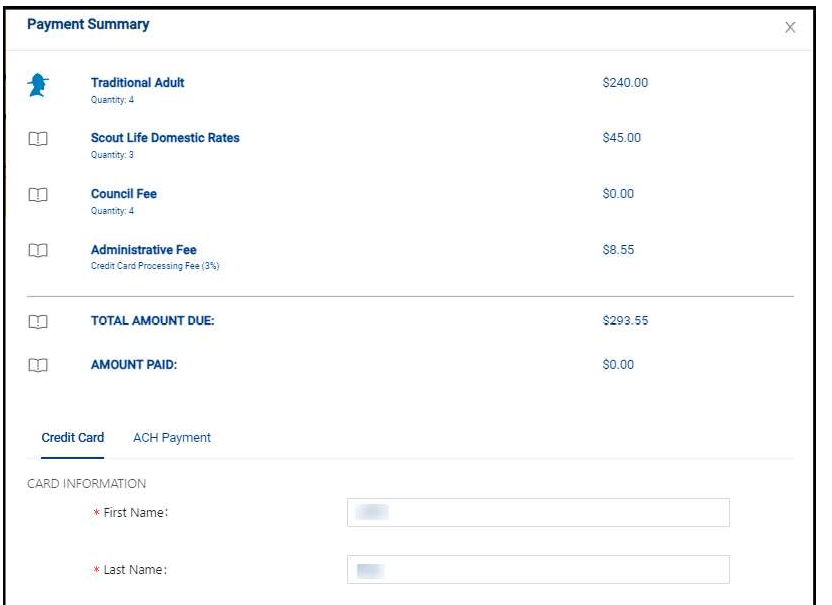
UNIT PAID MEMBER RENEWAL ONLINE (Credit Card/ACH)
1. Log into My.scouting.org and click on Organization Manager then Roster. Select the eligible members you wish to renew and then select Renew from the gray menu bar.
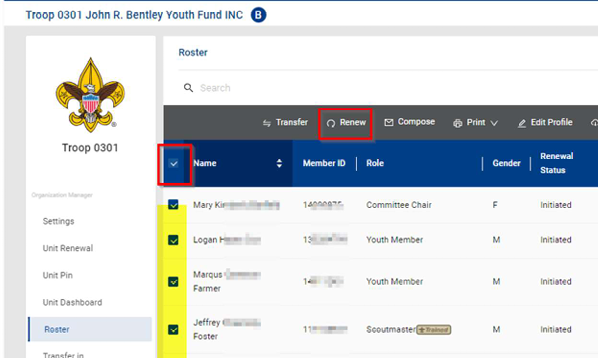
2. Review the list of Members to renew and Click "Create Renewal Order".
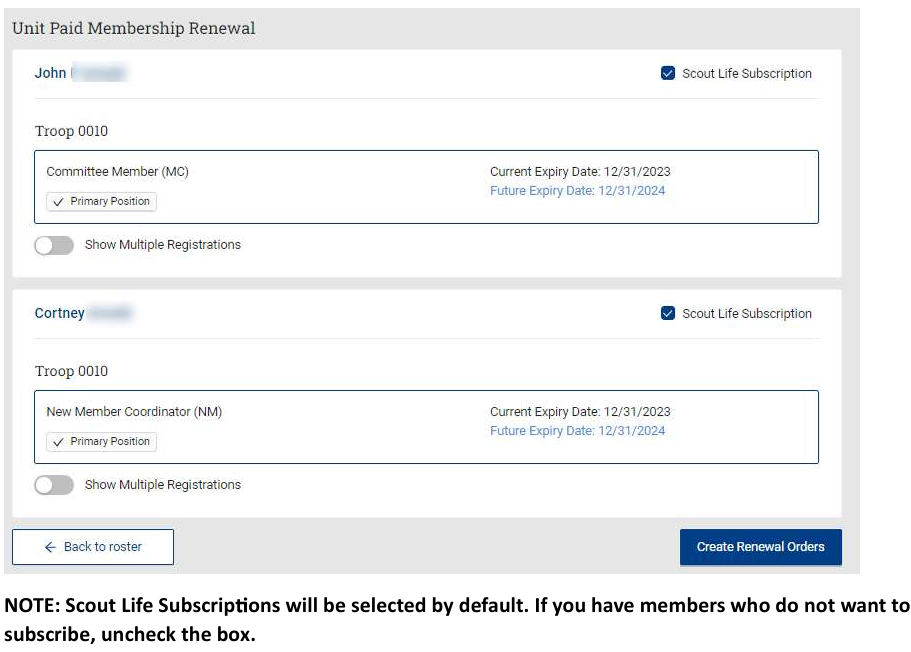
- Check for Scout Life Magazine subscriptions. System defaults to YES.
- After creating the order you will be directed back to the Roster main page. See next.
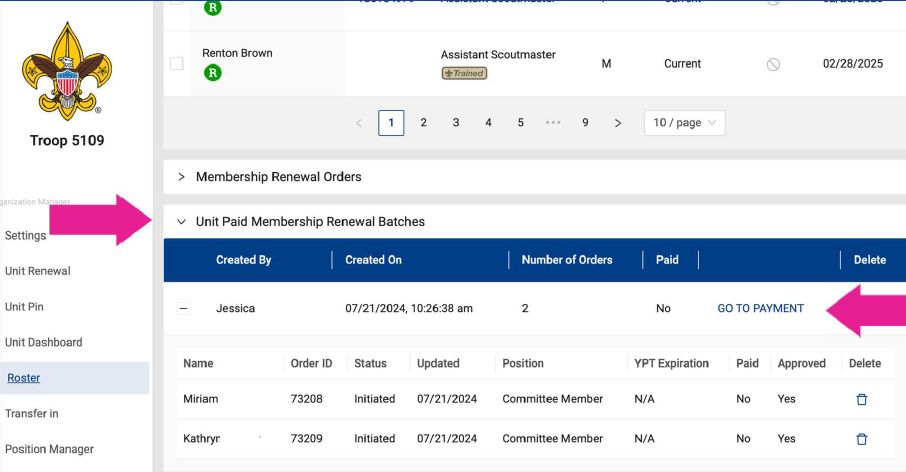
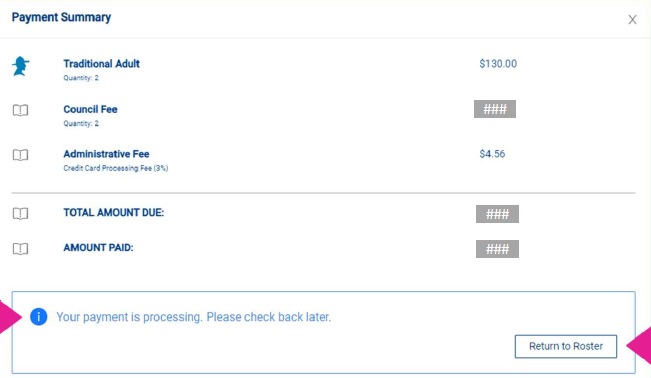
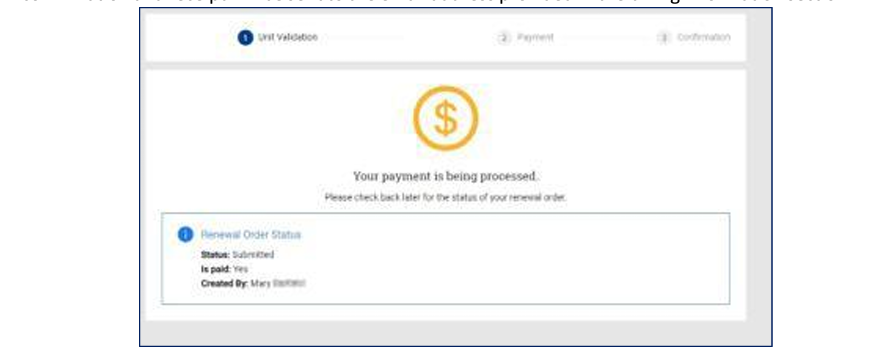
Step #4. Return to the Payment Summary to see "payment is processing."
Step #5. Return to Roster - Unit Paid Membership Renewal Batches - to confirm payment has processed.
Unit Renewal Process
All Units expire calendar year end - December 31. All Unit Renewals will open for processing November 1 (60 days prior to expiration).
This process is to renew the Unit existence, NOT to renew individual membership.- Can be done by any Key 3 Member.
- Requires verification that minimum adult positions are filled and minimum youth membership is met.
- System checks for errors in Memberships.
Additional Step Outside of Online Renewal:
Print out a new Recharter Agreement for the 2025 year. Meet with your COR and IH to have this signed. Mail to office or deliver to your District Executive.
START UNIT RENEWAL
Step 1 - Log into My.scouting.Org. Select your Unit - Organization Manager. Select Unit Renewal.
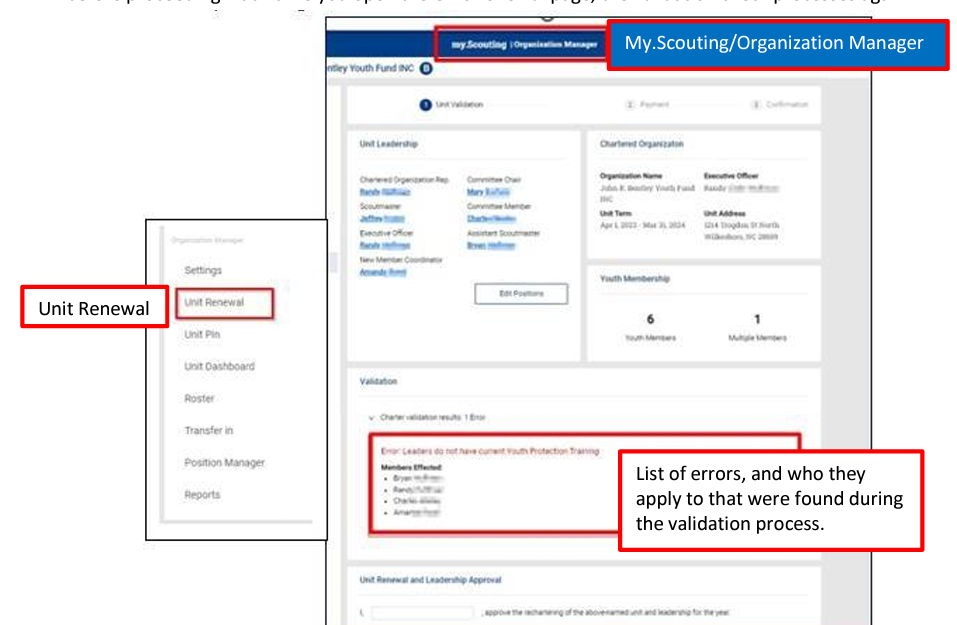 Step 2 - Review and correct any errors found.
Step 3 - Check that adults are listed in the correct positions.
Step 4 - Type in your name for approval.
*IF paying at Council Office via check or unit account balance, click the bottom button "Pay at Council". Follow prompts to print a payment report.
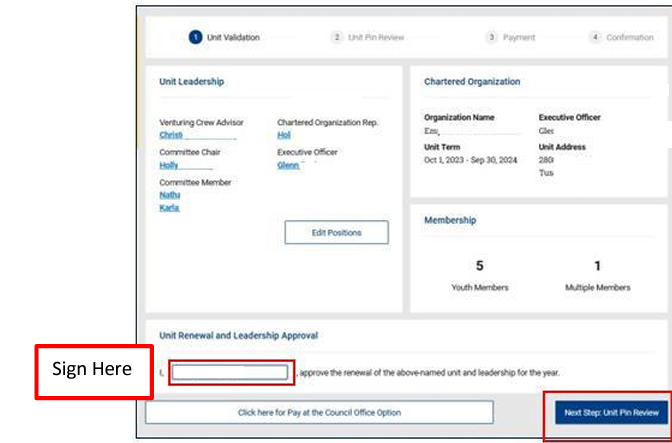 Step 5 - Continue on to check your unit BeAScout pin.
Step 6 - Continue on to Unit Renewal Payment.
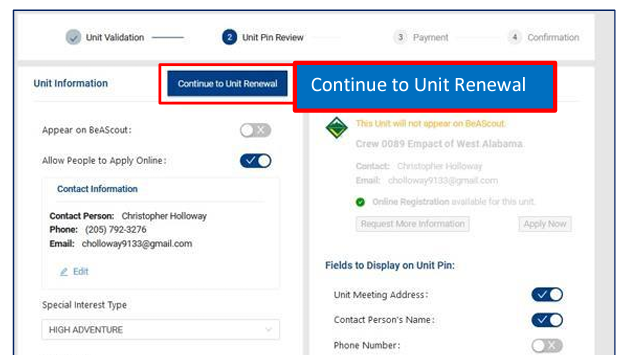
Step 7 - Select and complete online payment method if using. Select Go To Confirmation.
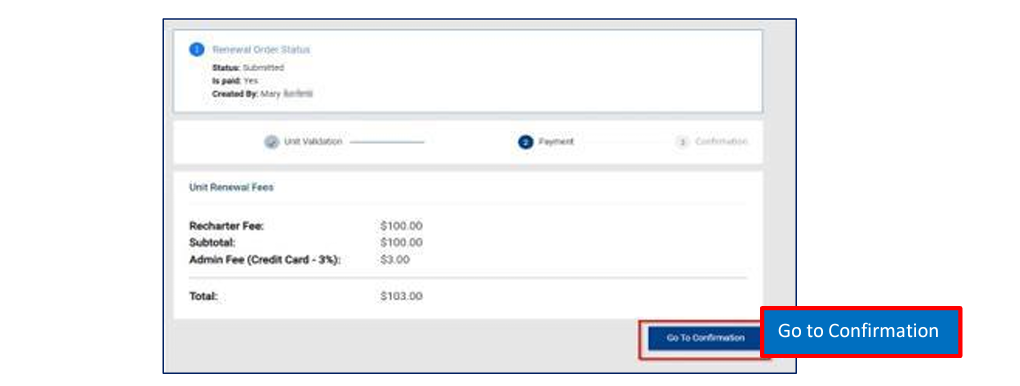
Step 8 - A Payment Processing confirmation will appear, and will also be emailed to the email entered under billing information. Unit will post overnight.
Frequently Asked Questions (sorted by topic)
RENEWAL CYCLE AND SCHEDULING
- When do individual memberships expire?
Individual memberships expire 12 months after the start of the individual’s membership term. Membership terms expire on the last day of the month. Membership renewal dates may be different for people in the same unit or same family. - Do units have to go in monthly to the tool to renew or opt people out?
Since membership is now on an annual basis per person, yes. They would need to check back monthly if they are paying for or opting out members. - Can an individual’s membership renewal date be changed?
No. Individual membership terms of periods other than 12 months and pro-rated membership fees are no longer available. - If a member joins in August, when is their renewal date?
If the effective date (start date) is in August, the expiration will be July 31. - Does the unit itself have to renew?
Yes. For most units in Golden Gate Area Council, this process will happen in the 4th quarter of the year. More information about this process will be available at that time.
- What is the email address that the renewal notices are coming from?
The email will be coming from Boy Scouts of America (noreply@scouting.org). - Do reminder emails go to multiple positions, or just paid positions?
Renewal reminders only go to paid positions. Be sure to verify your primary email address and, if necessary, update it. - Who gets the email reminder messages?
Messages are sent to people who are 18 or older about their own renewal. Messages are sent to the parents/guardians of people who are less than 18 years old. Messages are sent to the person’s primary email address recorded in the member registration database. Parents/guardians must be connected to their Scout in the national Akela member registration database in order to get the message. - What should we do if adults do not have email?
Emails are required for adults. They will need to create an email address at least for Scouting business. There are free services such as Gmail. - When an individual renews do the emails to renew stop?
They should stop when the renewal is paid for. - If a person is suspended, do they get any email reminders?
No. - How do we stop the automated emails?
Currently, the only two methods to stop the automated registration emails are to complete the renewal and payment process or to use the “opt out” function to indicate that the membership is not being renewed. - How do we change someone’s email address?
Email address changes should be made in my.scouting.org. People can change their own address in the “My profile” tab. Units can also edit contact information of their members in the my.scouting.org roster tool.
MY.SCOUTING.ORG AND MEMBER ID
- What is my member ID number?
Member ID numbers appear by your name on the first screen after you login to your my.scouting.org account. If you are unable to login to your account, your unit can get a list of their members and associated member ID numbers in the my.scouting.org roster tool. - How do I reset the password to my my.scouting.org account?
Use the “Forgot username /password” link on the my.scouting.org login page and follow the prompts to provide the required information. If this does not work, contact the Council Registrar for assistance. See the additional support section for contact information. - What is my my.scouting.org account username?
If you have an account, you can recover the username by using the “Forgot username /password” link on the my.scouting.org login page and following the prompts to provide the required information. If this does not work, contact the Council Registrar for assistance. See the additional support section for contact information. - How do I create a my.scouting.org account if I don’t have one?
Follow these instructions. Please do not create a new account if you are unable to login into your account or if the system finds that you already have an account. If you encounter difficulties, contact the Council Registrar for assistance. See the additional support section for contact information. - Do I need a different my.scouting.org account for each member of my family who is in Scouting?
No. Each person should only have one my.scouting.org account. If necessary, this account can be linked to multiple family members and multiple positions within the organization. For assistance with creating these links, contact the Council Registrar for assistance. See the additional support section for contact information.
INDIVIDUAL ACCESS TO RENEWAL
- Who can renew their own membership?
Individuals who are 18 or older can renew and pay for their own membership. Membership for individuals who are less than 18 years old can be renewed by a parent or guardian who is connected to them in the Akela membership database. - What should we do if a parent doesn’t see their child in the parent’s my.scouting.org account?
Contact the Council Registrar for assistance.
UNIT ACCESS TO RENEWAL
- Who is in the unit Key 3?
The unit Key 3 includes the Chartered Organization Representative (COR) in traditional units with an independent chartered organization, Council Unit Representative (CUR) in council registered traditional units, the Committee Chair, and the unit leader. The unit leader is the Cubmaster (for packs), Scoutmaster (for troops), Venturing Advisor (for crews), Skipper (for ships), the Explorer Post Advisor (for posts), or the Exploring Sponsor (for clubs). - Who has access to the renewal system for a unit?
People who are registered in a Key 3 position, Key 3 delegate position, or COR/CUR delegate position have access to the roster tool and the unit renewal system. If a person is newly registered into one of these positions, it may take up to a day after their registration is approved for them to get access to the system. Approval of individuals who are new to Scouting may take longer due to their background check. - Who can approve renewal requests for a unit?
Renewal requests for individuals who are 18 or older can only be approved by the COR, CUR, or COR/CUR delegate. Renewal requests for individuals who are under 18 can be approved by these people, as well as the other members of the Key 3 and Key 3 delegates. - Can a unit leader see missing parent/child connections in My.Scouting.org?
There is not currently a way for them to see that. - Does creating a parent/child connection in Scoutbook create one in my.scouting.org?
This does not work reliably. Contact the Council Registrar if a parents are unable to see their children. - Do we need to individually approve each person’s renewal?
Yes, however the unit may choose to turn on the auto-renewal setting. Please note that there may be a slight delay (<24 hours) before changes to this setting take effect. Changing the “Allow auto approve renewals” setting only affects renewals submitted after the change takes effect. The approval requirement for renewals submitted before this change does not change, so if you have individuals renewals awaiting approval, you will still need to approve them manually when enabling this option.
To get to this screen to do auto approve renewals, select “Settings” (which is likely your default) instead of “Roster.”
PAYMENT
- How does a scholarship affect the payment and renewal process for members?
The “pay at council” option must be used for people who are applying for a scholarship. The scholarship application must be included in the submission to the Council Registrar. - What methods of online payment are available and how much do they cost?
People using the self-pay or parent-pay methods can pay using a credit card. There is a 3% charge to pay using this payment method. Units who pay for their people using a credit card will be charged the same fee. Units also have the option to make an online payment using ACH. This method charges $1 per transaction. Units can renew multiple people in a single transaction. - Is there an extra charge to pay at the council?
No. - Is there a way to keep parents and individual members from paying if the unit wishes to pay?
Not directly, but the system will not let the same person be paid for twice. If the unit intends to pay for people, the unit should complete the renewal and payment process shortly after the individual’s renewal window opens. This will stop additional automated renewal messages from being sent, and will prevent additional payment. - What should be done if someone paid online and also paid their unit treasurer for their membership?
The unit treasurer should issue a refund to the person. - For pay at council it only shows the leaders. How can we see the youth?
There are two tabs, one for youth and one for adults in roster. - If the unit pays for and renews some of its members, does it have to pay for and renew all of them?
No. As long as the unit does not opt out the members that it is not paying for and renewing, the remaining individuals are able to complete the individual/parent renewal and payment process on their own.
SCOUT LIFE MAGAZINE
- Will renewal default to include Scout Life, even if they don’t have it currently?
Yes. People will need to turn this off if they don’t want the magazine. - Is Scout Life combined for each member in the same family, or the family as a whole?
Whether or not to get Scout Life is a choice that must be made for each individual member. Unit awards for 100% Scout Life subscription only require one subscription per mailing address.
OPT OUT
- What does “opt out” actually do?
“Opt out” should be used for people who are not renewing their membership in Scouting. It will stop the national automated renewal emails to the person. - Does the Member Opt Out Report display the reason someone is leaving?
It currently does not. This function may be added in the future. - If a unit opts for families to pay their own renewal fees, how do they select someone they don’t want renewed in their unit?
They would select “Opt out” for that person. - Does “opt out” immediately end someone’s membership?
No. The membership expiration date does not change. The person can continue full participation in the organization until this date. A person who is still interested in participating in Scouting might “opt out” of renewal if the person is moving away from the area and the person’s membership has not yet transferred to the new location. - Can we opt in someone who was previously opted out?
If the person is still within their membership renewal period, yes. In the unit roster, select the button in the “opt out” column. This will bring up a dialogue box that asks if you would like to opt this person in to renewal. Although the wording of the question in the dialogue box does not make this clear, answering yes to this question merely allows the person’s membership to be renewed; it does not complete the renewal process. Either the unit or the family will still need to complete the renewal process.
NEW MEMBERS AND NEW POSITIONS
- Can the renewal system be used to add new members?
No. New members (including members transferring from other units) must use the normal process to join a unit. This involves submitting a paper application to the council or using the online application system. - When should we make membership changes, such as moving people to new units or new positions?
These changes should be made, submitted, and approved as soon as they happen. Changes should be made before individual and unit registrations expire. - Could people change their own position within a unit?
No. Position changes must be initiated by the COR/CUR or the COR/CUR delegate using the position manager tab of the my.scouting.org organization manager. Paper applications can also be used to make position changes.
PEOPLE WITH MULTIPLE POSITIONS
- How will a multiple registration be verified if the primary position hasn’t been paid?
Verification will fail. The primary position has to be paid first. Units cannot renew people as a multiple until their registration fees are paid. In order to renew the membership of these people, the unit will need to coordinate payment with the person. - What are primary/paid positions and multiple positions?
A primary/paid position is the registered position where the person’s membership fees are paid. For people who have only one registered position, the primary/paid position is their only position. People who have more than one current position (a leader who is registered with both a pack and a troop, an older youth who is registered with both a troop and a crew, etc.) have one position designated as their primary/paid position, and their other positions are referred to as multiples. No additional fees are charged for multiple positions. - For people who have multiple registered positions, which one is their primary position?
The primary position is the first position that pays for a person’s registration. People who pay online to renew their own membership or the membership of their children can select which position they would like to be primary. The option to select a primary position will not be available to people whose registration renewal has already been paid using another method (e.g. their unit pays for them). This method of determining the primary position is new for 2024. - How does the volunteer see that one of their multiple members has paid elsewhere?
The system will use the word “multiple” to indicate it on the roster report. - If the unit renews members, does it allow them to renew all of a member’s positions (including multiple in other units) or is it just the membership for that one unit?
Membership for that one unit. - Will a unit see a volunteer’s other positions when renewing them?
The Unit only sees the registration for their unit. - How should people who are registered in multiple councils (including the national council) renew their registrations?
People whose are keeping their primary/paid membership in Occoneechee council can use the normal process to renew their Occoneechee positions. They should contact their other council’s registrar to renew their membership. People whose primary/paid position in another council should contact the Occoneechee Council Registrar to renew their membership. - Can people change their primary/paid position during the renewal process?
People who are currently registered in multiple positions can change their primary/paid position to another one of their current positions. - Who pays for people who are registered in multiple positions?
People who are registered in multiple units only pay the national and council membership fees once. If they are paying for themselves or their child, they can select one of their positions as their primary/paid position when they renew their membership. Once a payment is recorded for someone, the system will not collect additional payments for their membership. Effectively, this means that if multiple units attempt to pay for the same person, then the system will accept payment from the first unit to pay, make the position in that unit their primary position, and it will not take payment from other units.
ADULT REQUIREMENTS
- Who is considered an adult?
For the purposes of registration requirements and youth protection policies, individuals who are at least 18 years old are considered adult. This policy applies to all positions, including crews, ships, and posts where 18–20-year-olds can be registered as program participants. In order to receive the adult membership rate, individuals in troops and packs must be 18 or older, and individuals in crews, ships, and posts must be 21 or older. - Are there special requirements for renewing the membership of adults?
Registration renewal for adults cannot occur until youth protection training is current. Adults must pass a background check, but this usually requires no action from renewing adults. Notification will be provided if additional information is needed for this process. - What do people who have recently turned 18 need to do to renew their membership?
All individuals who are 18 or older need to follow all adult membership rules, including those relating to youth protection. If the person has never submitted an adult application, they will need to submit a completed adult application for each unit. Due to the process used to approve adult registrations, separate applications will need to be submitted for each position and unit. The online registration system is known to have problems converting youth memberships into adult memberships, so completing a paper application is recommended.
COUNSELORS AND MENTORS
- What is the renewal process for merit badge counselors, nova counselors, and supernova mentors?
If they have any other position, they need to renew their other position(s) first. Then, they should follow the counselor/mentor registration process. If they have no other positions, payment is required as part of the counselor/mentor registration process. See the council advancement page for more information about the process specific to these positions.
REPORTING
- What do the values in the Renewal Status column on the my.scouting.org roster mean?
Current – Membership is current. The renewal period for this person has not started.
Eligible to Renew – Membership is current, but it is time to renew this person’s membership
Opted out – Member is leaving or has already left unit and membership is not being renewed
Pending Approval – Renewal application and payment have been submitted, and the unit needs to approve the renewal to complete the process. Follow these instructions.
Expired – Membership term has ended. Continued participation in the program requires membership renewal or a new registration. - Is there a report the unit can run that shows who they paid for during renewal?
Yes, there is a summary report that can be printed during the renewal process. - What does the R in the green circle indicate?
The “R” shows who has renewed. - What do the status messages in the Membership Renewal Orders and Unit Paid Membership Renewal Batch areas mean?
Initiated = Renewal process started but not yet submitted.
Submitted = Payment submitted for the renewing term.
Pending Approval = Payment successfully processed/received and waiting on approval.
Completed = Renewal was approved for the renewing term.
Closed = Renewal could not be completed either for payment issues or the member decided to withdraw their renewal.
Declined = The renewal position was not approved.
ADDITIONAL SUPPORT
- Who should we contact with questions?
Contact the Council Registrar, Registrar@ggacbsa.org, or 925-674-6100.
What happens when a member is Expired?
Didn't find what you needed on this page?
Check out the BSA National website on Renewal Registrations: BSA National Unit and Member Renewal Information Webpage
Check out the How To options and the FAQ pages listed on the bottom of this website for additional information.
You are always welcome to contact for Unit Leader, District Committee, and District Executive for unanswered questions.